
Export
Claude Code, Codex, Cursor, ChatGPT exports, DeepSeek, Qwen, and OpenClaw data.
 ChatGPT
 Claude Code
 Codex
Codex Cursor
 DeepSeek
 Qwen
Qwen OpenClaw
capture -> seal -> search
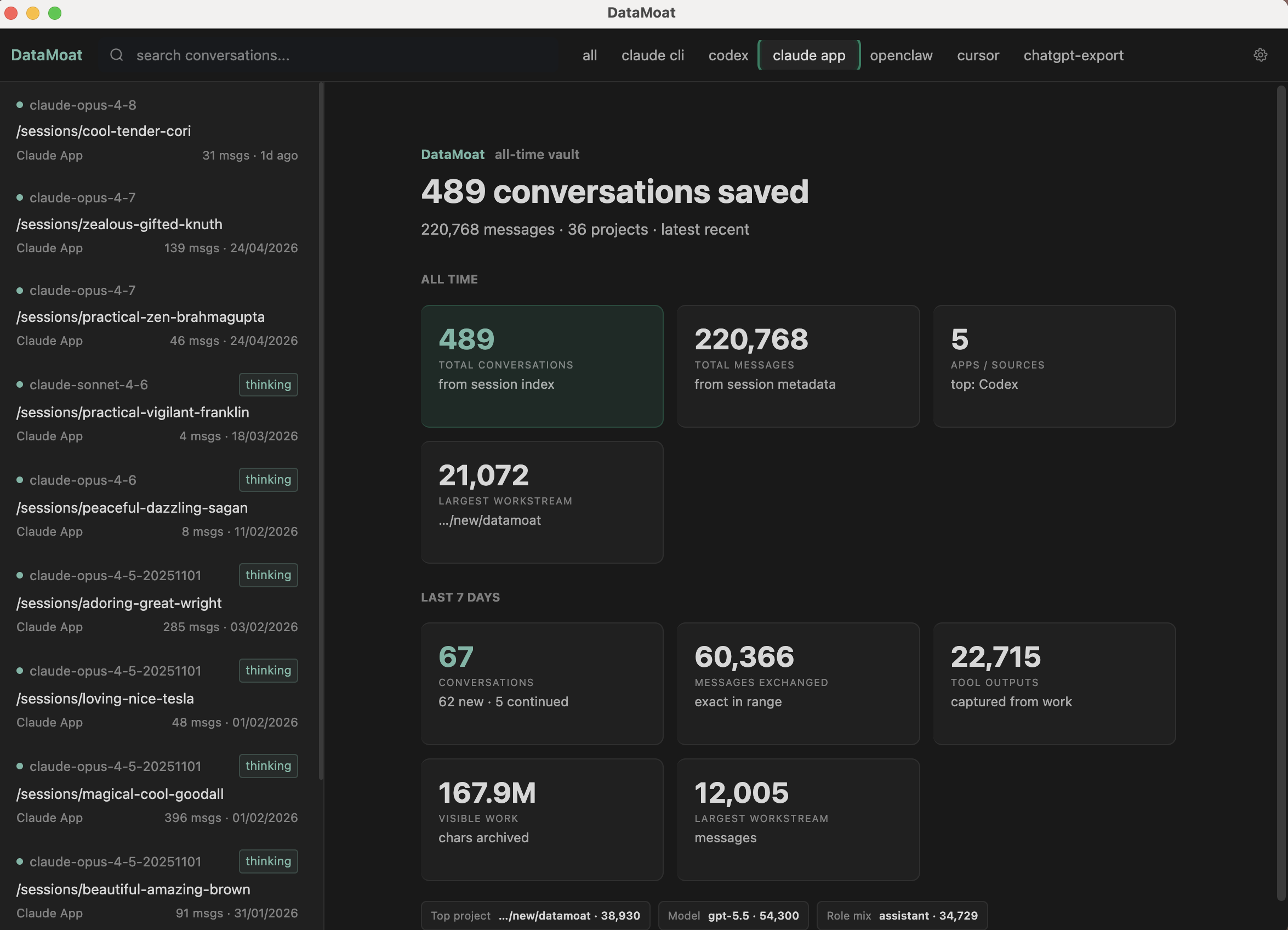
Find it, reuse it, and do more without starting from zero every time.
For people and teams, every AI task becomes part of a private system that gets more useful over time.
Claude Code, Codex, Cursor, ChatGPT exports, DeepSeek, Qwen, and OpenClaw data.
Supported sessions, tool outputs, versioned attachments, images, files, and skills.
Encrypted raw archives are compressed; real source-record tests measured about 60% of original source bytes.
Search prompts, tool outputs, attachments, and decisions. Ask how a bug was solved before or why an AI made a decision.
Bookmark messages and sessions, export context, and build your own RAG or internal database.
AES-256-GCM, 24-word recovery phrase, hash-chained audit checks, and Secure Enclave-backed unlock on supported Macs.
Capture, search, and export from the computer you control.
Saved sessions, skills, attachments, and source records stay protected in a local archive.
DataMoat does not receive your memory encryption keys, transcripts, skills, attachments, or search history.
DataMoat brings supported sessions, skills, attachments, source records, and local platforms into one protected memory archive.
ChatGPT exportClaude CodeDeepSeekQwenCodexOpenClawCursorDataMoat v2.0.11
Free for personal use and internal company use. No DataMoat cloud account; no one else can access or own your archive without your permission.
No DataMoat cloud account. Your memory archive stays local.
Windows ZIP + DataMoat.exe packages are portable app folders. Unzip the package, keep the folder together, and launch DataMoat.exe to use the app now. Run Install DataMoat.cmd once if you want startup registration for this Windows user.
What's new in 2.0.11
DataMoat 2.0.11 polishes the desktop conversation view, adds portable chat exports, and hardens packaged Windows update, clipboard, no-screen, and restore flows.
Conversation layout, metadata rows, bundled JetBrains Mono styling, and light/dark theme behavior are calmer and easier to scan.
Export a conversation as files that can travel outside DataMoat while keeping structure and attachments together.
Packaged Windows builds use Electron's native clipboard bridge, with browser clipboard fallback still available when needed.
Manual update checks no longer look like a downgrade, and no-screen/startup launchers avoid lingering command windows that can kill tray capture.
Transfer/restore setup avoids overlay bounce on network drops, and Mac Touch ID refresh prompts stay hidden on Windows.
Your AI work history is not just history. It is the work-process data your future agents and employees will need: the prompts, context, tool calls, outputs, corrections, decisions, files, logs, attachments, and skills behind finished work.
Those traces are private data assets: what the human asked, what context the agent saw, what tools were called, what files and skills were present, what was corrected, and what eventually worked.
Search past prompts, solutions, tool output, thinking-token context when present, timestamps, metadata, files, images, PDFs, attachments, and saved skills without depending only on a live service view.
Your AI work memory archive lives on your machine, encrypted at rest. DataMoat does not receive your transcripts, skills, attachments, memory database, search history, or memory encryption keys.
AES-256-GCM memory archive storage with password-based unlock, optional TOTP, 24-word recovery phrase, local auditability, and Touch ID / Secure Enclave unlock on supported Macs.
Auditable source chain
DataMoat is designed to keep AI work reviewable. It preserves supported raw/source records and builds normalized session records so later review can connect work back to the original prompt, response, file, timestamp, tool output, attachment, model, and source app that produced it.
Original source records, ChatGPT export files, session JSONL, logs, metadata, skills snapshots, and attachments are preserved when the source provides them, then stored inside the encrypted memory archive.
Normalized records keep prompts, responses, tool use, tool results, timestamps, model metadata, source path, and stable attachment links together so the surrounding work can be reviewed later.
The memory archive, search data, skills, attachments, and memory encryption keys stay on-device. DataMoat is not a platform-account personalization layer or transcript cloud.
Supported ChatGPT exports, Claude, Codex, Cursor, DeepSeek/Qwen local workflows, OpenClaw, skills, and attachments land in the same local memory layer instead of staying trapped inside one vendor view.
Work history becomes a protected company or personal asset for review, incident analysis, onboarding, handoff, private memory, and future model evaluation under your own rules.
If the team changes tools or models, the memory layer can move with the encrypted DataMoat folder. Vendor choice changes; custody of the work record stays yours.
AI work interaction data layer
Every AI-assisted task creates interactions between people, agents, files, tools, prompts, outputs, corrections, and decisions. DataMoat turns those interactions into an encrypted private data asset that future agents and employees can search, reuse, audit, and hand off.
That makes DataMoat more than a backup utility. It is the enterprise AI work black box and private knowledge base for the work your people and agents already did.
Keep the work record around incidents, migrations, bugs, product decisions, and repeated workflows so the next person can find the path, not just the outcome.
Preserve supported file context, attachments, skills, metadata, local source records, and the surrounding session that shaped the answer.
Save the prompt trail, corrections, constraints, clarifications, and decisions that turned a vague task into a usable result.
Capture supported tool calls, command output, errors, timestamps, source metadata, and stable attachments when the source writes them locally.
Keep the evidence around the adopted approach: alternatives discussed, failed paths, final commands, review notes, and the reason the team moved forward.
Make AI work searchable for reuse, audit, incident review, onboarding, project handoff, and private AI memory across ChatGPT, Claude, Codex, Cursor, DeepSeek, Qwen, and OpenClaw workflows.
DataMoat captures supported sessions, skills, attachments, and source records into the same encrypted local memory archive, preserving the interaction history companies need before it disappears into app-specific history, compaction, cleanup, or machine moves.
DataMoat provides a real local capture, encrypted memory archive, and review foundation for supported AI work records, skills, and attachments.
Captures supported local records from Claude CLI, Codex CLI, Codex app sessions, Claude Desktop local-agent sessions on macOS, OpenClaw, Cursor, and DeepSeek or Qwen sessions when they are written locally by Claude Code GUI workflows.
Stores protected content as encrypted memory archive files instead of plaintext transcript dumps, with transcripts, skills, attachments, state, and source records encrypted at rest.
Normalizes supported records into session and message structures with prompts, responses, tool use, tool results, usage, model, timestamps, metadata, and parsed thinking blocks when available.
Stores supported image, document, and file attachments plus full SKILL.md folder snapshots, then lets you browse and search captured sessions locally after unlock.
Security architecture
DataMoat is designed around local ownership: supported source records, skills, and attachments are captured on your machine, written into AES-256-GCM encrypted memory archive storage, and searched only after a local unlock. DataMoat does not receive your transcripts, skills, attachments, memory database, search history, or memory encryption keys.
It protects AI records that already exist on your own computer in source-tool folders, exports, logs, attachments, or session stores. It does not bypass account permissions, unlock remote services, or grant rights beyond what you already have on that machine.
Many AI tools already store work history as ordinary local files on the computer. Anyone or any process with access to that user account, disk, backups, or source-tool folders may be able to read those records before DataMoat protects them. DataMoat does not make this data more exposed; it moves selected already-present records into an encrypted archive controlled by the user.
Background capture can keep saving new supported records while the UI remains locked. Reading and searching existing memory content still require an approved unlock path: password, optional TOTP, Touch ID on supported Macs, or recovery phrase.
Memory JSONL lines, state files, raw records, and attachments are encrypted at rest with AES-256-GCM using 12-byte nonces and 16-byte authentication tags.
Normal unlock uses scrypt-derived material and stores verifiers or wrapped-key records instead of a plaintext password or plaintext memory encryption key.
The 24-word phrase is the local recovery path. DataMoat stores wrapped recovery material, not the phrase as readable text.
A background capture session can write new encrypted data and encrypted offset state while the UI stays locked; reading, searching, and display remain behind local unlock.
DataMoat saves encrypted raw source records before extractor logic decides what to show, so future extractors can rebuild richer views from the protected copy.
datamoat audit verify detects changed or broken entries in the current on-disk audit log. It is not a remote notarization service or deletion-proof ledger. Health/crash records redact secret-like values including tokens, mnemonics, recovery material, passwords, and memory encryption keys.
Threat model
DataMoat is not asking you to create a new sensitive dataset from nothing. For many AI tools, that dataset already exists on your computer as local transcripts, logs, exports, SQLite records, JSONL files, attachments, and skills folders.
Without a dedicated archive, those records may remain scattered across predictable local paths as ordinary files controlled only by normal OS account permissions. DataMoat helps you identify those records, copy selected supported records into a local encrypted vault, and keep a recoverable, searchable, auditable archive under your control.
DataMoat does not create new access to remote AI services and does not bypass OS permissions. It only reads records already available to the current local user, then stores selected supported records into a local encrypted archive controlled by the user. The supported local read paths and capture reasons are visible in the public application code for review; DataMoat does not use hidden cloud collection or undisclosed remote capture.
DataMoat does not automatically erase original source files. Unless the user chooses a cleanup/export workflow, original records may still remain in the source apps' folders. Installing DataMoat introduces a local watcher/importer process with access to selected AI record locations; in exchange, users get an encrypted archive, recovery path, audit log, and portable backup instead of leaving important AI work scattered in unencrypted local files.
Future brute-force resistance
A DataMoat recovery phrase uses the BIP-39 24-word format, which encodes 256 bits of entropy plus checksum bits. That phrase is a human-backup path for releasing the memory encryption key locally; DataMoat does not store the phrase as readable text.
The memory archive itself is sealed with AES-256-GCM. NIST treats AES-256 as the 256-bit symmetric-key security-strength baseline, and its post-quantum guidance says known quantum brute-force techniques such as Grover-style search do not currently turn high-strength symmetric encryption into a practical break. In plain English: today, the realistic risk is losing or exposing your recovery phrase, not someone GPU-guessing or quantum-cracking a properly generated 24-word phrase and AES-256 memory archive.
Raw-first archive
AI tools change their local formats quickly. DataMoat's raw-first path keeps an encrypted copy of the source record before transforming it into a searchable session, which reduces the risk of losing context when a parser gets better later.
A local memory archive should make each boundary visible: what gets read from supported source files, what is written encrypted, what requires human unlock, and what DataMoat never receives. The goal is to move already-present records into a user-controlled encrypted memory archive instead of leaving them scattered, readable, or dependent on opaque memory plugins.
Supported AI tool records are read from local files. Raw source lines are content-stamped before extraction builds a searchable view.
source line -> sha256
Memory archive lines, raw records, offsets, session state, skills, and attachments are encrypted with AES-256-GCM before they become the protected copy.
nonce(12) + tag(16) + ciphertext
Password, optional TOTP, 24-word recovery phrase, or Touch ID on supported Macs opens read/search.
scrypt verifier + wrapped key
Existing memory content is decrypted only after local unlock. Browse and search happen through the local app, and DataMoat does not receive your memory archive, search history, or keys.
read session -> local UI
ZIP or extracted export imports with conversations, attachments, raw snapshots, and alternate branch paths.
Full local transcript capture, including locally written thinking blocks when present.
Terminal sessions, transcript text, tool output, timestamps, metadata, and stable attachments.
Supported local app sessions, tool output, metadata, and stable image attachments.
Supported local-agent sessions on macOS when the desktop app writes them to disk.
Claude Code GUI sessions using DeepSeek models preserve locally written transcript text, tool output, timestamps, metadata, skills context, images, and supported attachments.
Claude Code GUI sessions using Qwen models preserve locally written transcript text, tool output, timestamps, metadata, skills context, images, and supported attachments.
Supported local OpenClaw transcripts plus provider, model, and cost metadata when present.
Readable local agent-transcripts JSONL records, including text and tool blocks when present.
Encrypted image versions and supported file/PDF blocks, linked back to their source sessions when the source records contain them.
Global and project SKILL.md folder snapshots, including helper files, not just skill names.
Keep the work-process context your own future agents and employees can use: prompts, decisions, corrections, files, skills, attachments, and results.
Keep AI-assisted work reviewable across people, projects, machines, and clients without losing the process behind finished work.
Export and back up the private data asset that can later support private memory, evals, handoff, workflow analytics, or company-specific review under your rules.
Download DataMoat v2.0.11 and start exporting and backing up supported sessions, ChatGPT exports, skills, and attachments before they disappear.
Download links use direct DataMoat package URLs for macOS and Windows.
The landing page may call the DataMoat release manifest to keep the download button current, but DataMoat does not receive your prompts, transcripts, tool output, files, skills, attachments, memory database, memory encryption keys, or search history.
DataMoat captures and encrypts supported local work traces first. Backup scope is controlled by you and by the source records already available on the protected machine. Any later use for private memory, evaluation, handoff, or workflow review depends on your permissions, policies, and choices, and users or organizations remain responsible for deciding which local AI records, attachments, code, secrets, or sensitive data should be imported, retained, exported, or excluded.
For supported sources, DataMoat watches local transcript files and tracks byte offsets so new records can be captured quickly before compaction, retention cleanup, app format changes, device loss, or server moves make the original history harder to recover.
DataMoat preserves supported local transcript text, prompts, responses, tool output, timestamps, source metadata, stable image attachments, supported file/PDF blocks, full SKILL.md folder snapshots, and locally stored thinking tokens or reasoning blocks when the source application writes that content to disk.
Saved sessions are built from preserved source records and normalized with prompts, responses, tool output, timestamps, model/source metadata, files, and attachment links where the source provides them. The local audit log can be checked with datamoat audit verify; it is tamper-evident for the current on-disk log, not a remote notarization service or deletion-proof ledger.
DataMoat is designed to protect AI records that already exist on your own machine. It does not create new access to your AI work history, grant additional rights to source-service content, bypass account permissions, or unlock remote services. You remain responsible for the terms, policies, plan restrictions, internal rules, permissions, and laws that apply to ChatGPT, Claude, Codex, DeepSeek, Qwen, OpenClaw, Cursor, and any other source service you use.
DataMoat preserves what is locally available. Claude CLI local session records can include full thinking text, while newer Codex CLI/app records often keep reasoning content unavailable or encrypted by the source app, so DataMoat preserves transcript, tool output, timestamps, metadata, and attachments instead.
A plaintext export is easy to leak, modify, lose, or misread later. DataMoat keeps the protected memory as the source of truth, encrypts raw records, state, offsets, and attachment blobs, and lets you verify the current hash-chained audit log with datamoat audit verify. The local audit chain is tamper-evident, not deletion-proof without an external checkpoint.
Memory records, skills, attachments, offsets, and session index state are encrypted at rest with AES-256-GCM. Passwords are stored as scrypt verifiers, not plaintext, and the UI still requires an approved unlock path before old records can be read or searched.
Source installs support password, optional TOTP, and a 24-word BIP-39 recovery phrase. The packaged macOS app adds Touch ID and Secure Enclave-backed daily unlock on supported Macs.
Recovery is designed so you can regain access without storing your password in plaintext. Recovery material is shown locally during setup and should be kept offline by the human user.
An AI agent can download the macOS DMG or Windows ZIP, start DataMoat, and begin the remote no-screen capture flow. Password setup, TOTP enrollment, Touch ID, and the 24-word phrase should be completed by the human user on the machine being protected, not relayed through chat screenshots or remote messages.
The page starts with v2.0.11 direct DataMoat package URLs. Windows packages are portable ZIP + DataMoat.exe app folders. Manual downloads do not depend on the /download Function.
The codebase is public and source-available for review. Personal use and internal company use are allowed by the grant. We chose BUSL-1.1 to keep the code auditable while reducing the risk of misleading repackaged builds, malware clones, and unsupported commercial forks of a security-sensitive local archive tool. All application code is public for review, but resale, hosting, or other uses outside the grant should be checked against LICENSE.md. Teams that require signed or managed builds can contact us.